
Overview
Build Custom Interfaces and Distribute your Models
The GoldSim Dashboard Authoring Module provides a specialized set of tools (included in all GoldSim versions) that allows you to create custom designed interfaces, or "dashboards" for your models to make them accessible to non-technical users. Models created using the GoldSim Authoring tools can be saved as Player files and subsequently viewed and run using GoldSim Player, which can be downloaded for free from the GoldSim website.
The interfaces can be designed to include buttons, input fields, sliders and result displays, and the author can imbed text, tool-tips and graphics to provide instructions on the use of the model.
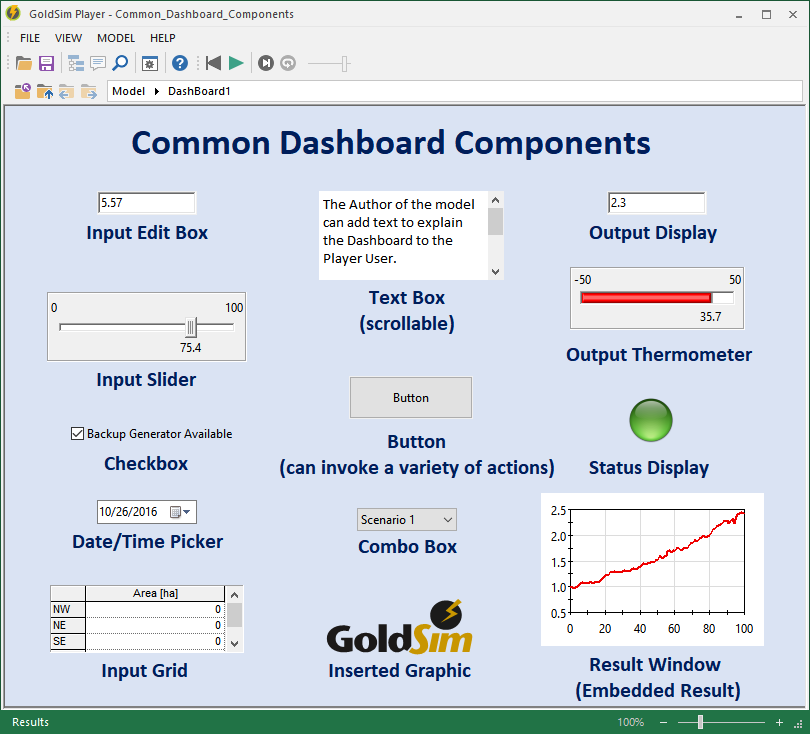
Such an interface allows a model to be easily used by someone without requiring them to be familiar with either the GoldSim modeling environment or the details of the specific model. Dashboards built using GoldSim Authoring greatly improve your ability to communicate your model structure and results.
The GoldSim Authoring Module enables you to create a "shell" around your GoldSim model exposing only those inputs and outputs that you feel are necessary to allow the user to use your model in a constructive way. You can choose to hide all the computational details of the model, or if desired, provide a mechanism by which the user can leave the Dashboard and "look under the hood" of the model. In effect, the GoldSim Dashboard Authoring Module turns GoldSim into a high-level programming language, which you can use to create custom simulation applications for distribution to end users who may not necessarily be modelers.
Learn More
- View some example Dashboards